 For Adobe Photoshop
CREATE 1,000+ JERSEYS READY TO PRINT IN 10 MINUTES.
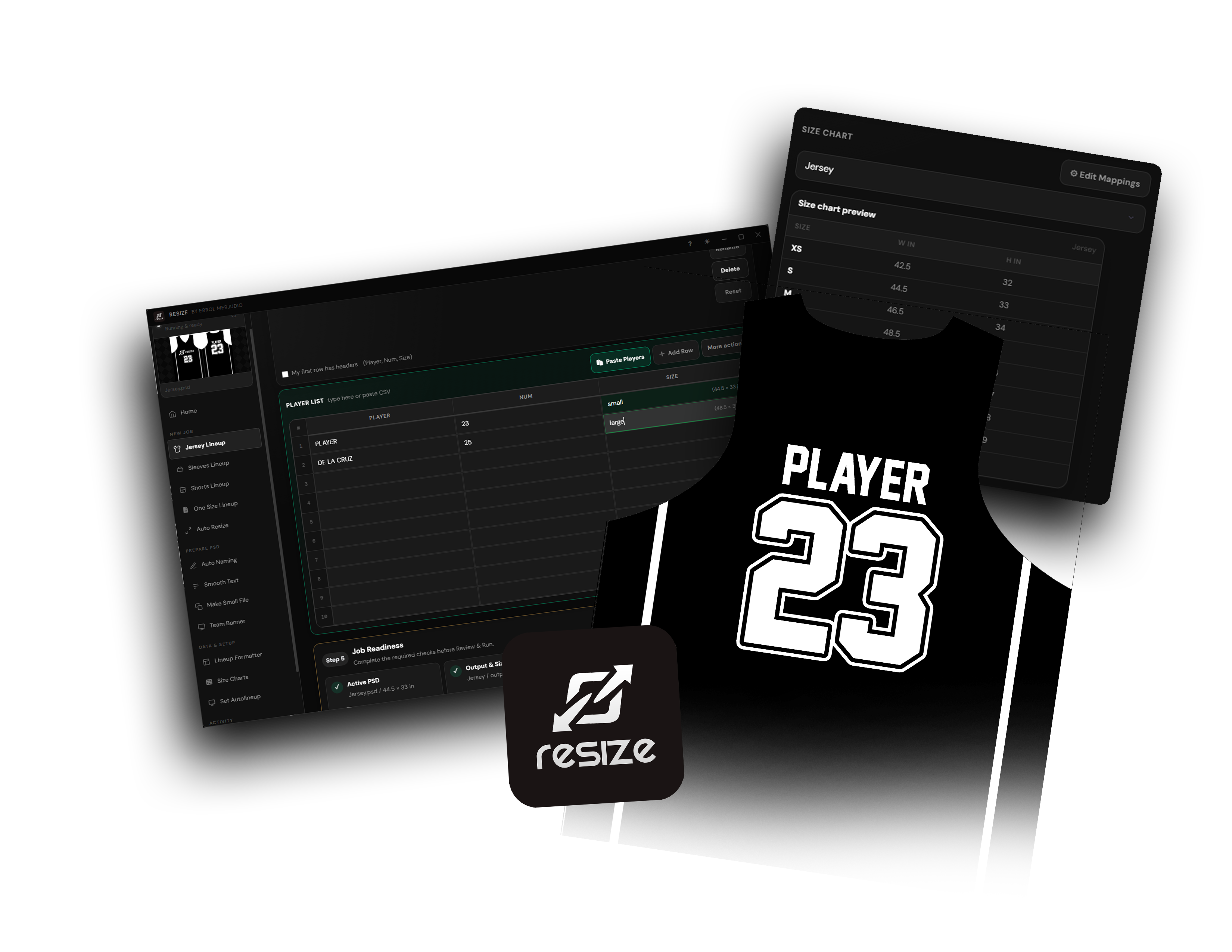
Just type in your player list. resize puts every name, number, and size into your Photoshop design — then saves all the files for you. No more doing it one by one.
SEE RESIZE IN ACTION
Watch how a full team order goes from raw roster to print-ready files — in minutes.
STOP DOING
1,000 JERSEYS
BY HAND.
Print shops waste hours opening PSDs, typing names, resizing canvases, and exporting files one by one. resize automates the entire pipeline — so you can take more orders without more hours.
Every Jersey Done.
Every lineup follows one clear order: confirm the active PSD, choose output and size, scan and match Photoshop layers, add player data, then review and run. Simple Mode keeps only the essentials visible; Advanced Mode adds mapping, naming, crop, quality, and layer controls without changing the workflow.
Every Size Covered.
Make one jersey template and create every required size with exact inch measurements. Before resizing, Scan & Prepare PSD checks text layers, live gradient/pattern/stroke styles, and visibility state. Hidden artwork stays hidden, while Player Name Fit Area measures styled bounds—including strokes—before a job starts.
Cleaned in Seconds.
Customers send their player lists in all kinds of messy ways — "santos 14 xl", a mixed-up list, or even a photo of handwritten notes. The AI Formatter figures it all out. It reads the names, numbers, and sizes, lets you fix anything in a clean table, then sends it straight to Jersey Lineup with one click. No more retyping everything.
Cruz, Mike #7 medium
REYES 23 2XL shirt
dela cruz 5 size 8
Before the Run.
The permanent Job Readiness panel checks Active PSD, Output & Size, Scan & Prepare PSD, and Player Data in the same order as the app. Run stays disabled with an exact reason until every required item is valid, then Final Review shows output counts, warnings, mappings, and settings before Photoshop starts.
Everything inside resize.
From cleaning customer lineups to preparing Photoshop layers, producing every garment file, and reviewing the finished batch — every current app feature is included below.
New Job
The same five production choices shown first in the app sidebar.
Fills player names, one or two number layers, sizes, and custom columns. Resizes per player and exports JPG, PSD, or both with your own folder and filename format.
JerseyCreates personalized sleeve files from the same spreadsheet-style workflow, with custom size charts, text-layer mapping, crop direction, and export controls.
SleevesProduces a separate shorts file for every player and size, including optional pocket handling, custom naming, layer mapping, and JPG or PSD output.
ShortsUses the active PSD at its current dimensions, replaces connected text layers for every player row, and exports the lineup without requiring a size chart.
Current PSD sizeCreates selected garment sizes from the active PSD using exact inch measurements, custom size charts, filename controls, JPG quality, and reviewed output settings.
Multi-sizePrepare PSD
Clean and prepare the active Photoshop document before production.
Recognizes player, number, and size text by content, renames the layers, and moves them into place. Extra non-text or unnamed layers can be merged into one design layer.
Layer setupApplies smooth anti-aliasing to every text layer in the active Photoshop document for cleaner names and numbers across the whole design.
Text cleanupCreates a lighter small-size PSD copy from the active design, keeps the correct layer order, and opens the result ready for checking or production.
Smaller PSDCopies visible artwork from the active jersey PSD into the banner template so team presentation files are faster to assemble.
PresentationData & Setup
Prepare player data, reusable size charts, and complete uniform-set jobs.
Cleans typed lists, mixed formats, screenshots, and photographed notes into editable player columns, then sends the reviewed data to a lineup job.
AI + OCRCreate, search, import, edit, and reuse exact width-and-height mappings for Jersey, Sleeves, Shorts, Auto Resize, or every tab.
Custom mappingsRuns jersey, shorts, and optional sleeves from one reviewed player list. Select each PSD and size chart once, then process the full uniform set together.
Complete setActivity
Review completed production work and configure the app connection.
Keeps a local record of past runs with the job type, time, output location, and result. Reopen output folders or export history for tracking.
TrackingConfigure Photoshop connection and app preferences with readiness checks that confirm Photoshop is available before a job begins.
Configuration
PRINT SHOPS THAT
STOPPED DOING IT MANUALLY
resize transformed how we handle team orders. What used to take us a full day of Photoshop work now runs in under 20 minutes. The lineup formatter alone saves us so much time on data entry.
The Auto Resize feature is incredible. I just open my jersey PSD, select the sizes I need, and it handles everything — folder creation, file naming, JPG export. No errors, every time.
I process 5–6 team orders a week. Before resize, I was doing everything layer by layer. Now I paste the lineup and walk away. When I come back, all the files are ready and perfectly sized.
Every size.
Every format.
All scripts recognize these sizes automatically — type them any way you want, the formatter normalizes everything.
| Category | Sizes | Aliases accepted |
|---|---|---|
| Kids / Jersey Numeric | size 2 size 4 size 6 size 8 size 10 size 12 | 2, 4, 6, 8, 10, 12, size2, size4… |
| Adult Standard | 2XS XS S M L XL | small, medium, large, x-small, extra large… |
| Adult Oversized | 2XL 3XL 4XL 5XL 6XL 7XL 8XL 9XL 10XL | xxl, xxxl, xxxxl, xx-large… |
| Youth Letter | YXS YS YM YL YXL Y2XL Y3XL | youth s, youth m, y-s, y-xl, y-2xl… |
QUESTIONS BEFORE
YOU GET STARTED?
ONE TIME.
No Monthly Fees.
Try it for free first. When you're ready, pick the plan that works for your shop. No subscriptions, no hidden charges.
- Full access to all tools
- Works on 1 Windows PC
- Updates included for 1 year
- Renew anytime at the same price
- Full access to all tools — forever
- Works on 1 Windows PC
- Free updates, forever
- Pay once, never again
- Priority support
Try free first — no credit card needed to download
Choose your app.
Pick the version that matches the design app you use.
Photoshop
Use this page if your jersey designs are made in Adobe Photoshop.

CorelDRAW
Use this version if your jersey designs are made in CorelDRAW.
Affinity
Use this version if your jersey designs are made in Affinity Photo or Designer.
Try resize. Free Trial.
Sign up and we'll send you the download link. Install it on your Windows PC, open Photoshop, type in your player list, and your first batch of jerseys will be done in under 10 minutes.
YOUR NEXT 1,000 JERSEYS IN 10 MIN.
Stop doing it by hand. Sign up for your free trial — we'll send the resize download to your inbox. Open Photoshop and your first batch is done with one click.